How to Manage Multi-Company Accounting in Odoo
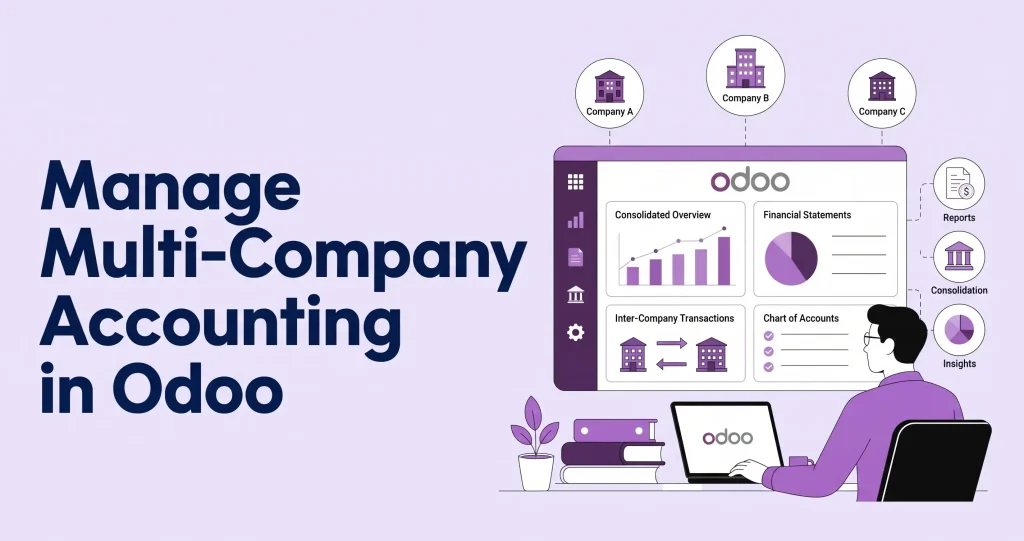
Managing accounts for more than one company can become difficult when each business has separate sales, expenses, taxes, currencies and financial records. Using different systems for each company can make it even harder because financial data has to be moved between different databases and compared manually.
Odoo makes it possible to manage multiple companies from one database. Each company can maintain its own accounting records while authorized users can access the company they need. Odoo also provides tools for inter-company transactions and financial consolidation.
Here is how you can manage multi-company accounting in Odoo.
Special Mux Tech Digital Offer
What Is Multi-Company Accounting in Odoo?
Multi-company accounting allows businesses to manage multiple legal entities within a single Odoo database.
For example, a business group may have:
- ABC UAE LLC
- ABC UK Ltd.
- ABC Pakistan Ltd.
Each company can have its own financial records, accounting setup, taxes and currency. At the same time, the group can manage the companies from one Odoo environment.
Odoo allows users to view information from multiple companies when they have the required access, although accounting work is performed in the selected company.
This setup is useful for businesses that operate in different countries or manage several legal entities.
How to Set Up Multiple Companies in Odoo
Before managing accounting, you need to configure the companies correctly. If your data still lives in spreadsheets, our guide on how to migrate from Excel to Odoo can help you prepare it first.
Create and Configure Companies
Go to Settings → Companies → Manage Companies and create a company by entering its basic information.
Depending on the business, you may need to configure:
- Company name
- Address
- Country
- Tax information
- Currency
- Accounting localization
The country selected for the company determines the fiscal localization package and the standard chart of accounts available for that country.
Set User Access for Each Company
Not every employee needs access to every company.
You can give users access to one or more companies according to their responsibilities.
For example, an accountant working for the UK company may only need access to that company, while a group finance manager may need access to several companies.
This helps keep company-specific records separate, and reduces the risk of users working in the wrong company.
Configure the Chart of Accounts
Each company can have its own chart of accounts.
This is important when companies operate under different accounting requirements. However, Odoo also supports shared accounts, which can be useful when companies need consistent reporting or consolidation.
Before creating accounts manually, review the default chart of accounts provided by the company’s fiscal localization and adjust it according to your accounting requirements.
How to Manage Accounting for Each Company in Odoo
Once the companies are created, you can manage their accounting separately within the same database.
Keep Financial Records Separate
Invoices, vendor bills and other company-specific accounting records should be created under the correct company.
Odoo uses the company field to determine which company owns a record. Company-specific documents are only available within the relevant company context.
This allows each company to maintain its own:
- Sales
- Purchases
- Expenses
- Invoices
- Vendor bills
- Journals
- Financial reports
At the same time, authorized users can manage more than one company from the same database.
Manage Taxes and Fiscal Positions
Companies operating in different countries can have different tax rules.
Odoo’s fiscal positions can automatically map taxes and accounts according to the customer’s or supplier’s location and other configured conditions.
This can reduce the need to manually select the correct tax and account for every transaction.
However, fiscal positions and tax settings should be reviewed carefully during implementation, especially when companies operate under different tax regulations.
Manage Multiple Currencies
Multi-company businesses may also work with different currencies.
For example, a group could have one company using PKR, another using AED and another using GBP.
Odoo records transactions in the company’s default currency while also keeping the transaction currency when a foreign currency is involved. Currency gains and losses can also be generated after reconciliation.
This makes it easier to manage international transactions without keeping separate accounting systems for every currency.
How to Handle Inter-Company Transactions in Odoo
Inter-company transactions happen when one company in the group sells goods or services to the other company.
For example, ABC Pakistan Ltd. may sell products to UAE LLC. Both companies need to record their transactions in their respective books.
Odoo can automate parts of this process through its inter-company transaction feature.
Inter-Company Sales and Purchase Orders
You can configure Odoo to synchronize sales and purchase orders between companies.
For example:
- Company A creates a sales order
- Company B receives a related purchase order
- The documents are linked between two companies
- The relevant accounting documents can then be created according to the configured workflow.
The products involved in an inter-company transaction must also be shared between the companies.
Automatic Inter-Company Invoices and Bills
Odoo can also synchronize invoices and bills between companies.
For example, when an invoice is posted for an inter-company transaction, Odoo can create a corresponding bill for the other company based on the configured rule.
This reduces duplicate data entry and helps keep both sides of the transaction aligned. To go further, see how to automate accounting with Odoo.
Before enabling synchronization, make sure the companies, products, taxes, journals and accounting configurations are correctly set up.
How to Consolidate Multi-Company Financial Reports in Odoo
Managing separate company accounts is only one part of multi-company accounting. Management may also need to see the financial position of the entire business group.
Odoo provides consolidation features for combining financial data from the separate companies into a unified view.
Account mapping can be used when different companies use different account structures. For example, several revenue accounts in one company can be mapped to a common group account for consolidated reporting.
Odoo also provides multi-ledgers and horizontal groups to help build consolidated financial reports such as the Balance Sheet and Profit & Loss statement. This gives management a group-level view while allowing each legal company to maintain its own books.
Common Multi-Company Accounting Mistakes to Avoid
Some common mistakes that can cause major issues are:
- Giving users too much access
- Mixing company-specific records
- Ignoring account mapping
- Automating inter-company transactions too early
- Treating a branch as a separate company
Frequently Asked Questions
Yes. Each company can have its own chart of accounts. Odoo also supports shared accounts where they are useful for multi-company reporting and consolidation.
Yes. Odoo can synchronize certain inter-company sales, purchases, invoices, and bills when the required rules and configurations are enabled.
Yes. Odoo allows multiple companies to be managed within one database. Each company can maintain its own accounting records while authorized users can access multiple companies.
Yes. Odoo provides consolidation tools that can combine financial information from separate companies into consolidated views.
Conclusion
Managing multi-company accounting in Odoo becomes easier when each company is configured correctly from the start. You can keep company accounts separate, control user access, manage different currencies and tax requirements, automate inter-company transactions and consolidate financial information in one system.
The key is to build the right structure before automating accounting processes. When companies, accounts, taxes, users, and inter-company rules are configured properly, Odoo can provide a centralized way to manage accounting across the entire business group. If you need help configuring multiple companies, you can speak with an Odoo partner in the UAE about implementation and support.
Recent Post
How to Manage Multi-Company Accounting in Odoo
How to Manage Multi-Company Accounting in Odoo Managing accounts for more than one company can become difficult when each business...
Follow Us
Stay connected with Mux Tech Digital for the latest updates, tips, and insights in Today’s World. Join our community to explore innovative solutions that can transform your business!
Grow Your Business With Us
At MuxTech Digital, we provide customized solutions for digital marketing, graphic designing, and software/website/portal design and development. We help you grow your business, increase your online presence, and reach your goals.